
Many people search for “666D Register” and land on pages that show different steps, different app sizes, or skip the OTP entirely. This guide sticks only to what works: the exact steps, the most common problems, and the safety checks that most other sites leave out. It also tells you what to do when something goes wrong so you never have to guess.
Last verified: October 2026 | Written for Android, iPhone & PC users
Quick summary
- Time needed: about 2 minutes
- You need: an active Pakistani mobile number, SMS signal, and a strong, unique password
- Age: 18 or older
- Cost: creating an account is completely free
What Does 666D Register Actually Do?
Registration creates a personal account linked to your mobile number. After that, you can log in anytime, see your wallet and history, and recover the account if you forget the password. Registration is free and takes only a couple of minutes. Everything after that (deposits, games, withdrawals) happens inside the app or web version.
Before You Register – Important Points
- You must be 18 or older.
- Deposits involve real money. Results are never guaranteed. Set a clear budget and treat the app as entertainment, not income.
- Questions about legality or whether it is halal in Pakistan: this site is not a legal or religious authority. Rules can change. Many people prefer to consult a qualified scholar or lawyer. The final decision and responsibility are yours.
Your Pre-Registration Checklist
Have these ready so the process stays smooth:
- An active Pakistani SIM that can receive SMS right now (Jazz, Zong, Telenor, or Ufone).
- Stable Wi-Fi or mobile data.
- A new, strong password you do not use for email, banking, or other wallets.
- The registration link from this official page (copycat pages are common).
- Your invite/referral code only if someone gave you one (optional).
666D Register – Step by Step
Keep your phone nearby so the OTP arrives without delay.
- Open the registration link from this page (or open the app if already installed). If you still need the APK, use our download guide first.
- Tap Register or Sign Up.
- Enter your Pakistani mobile number carefully and double-check every digit.
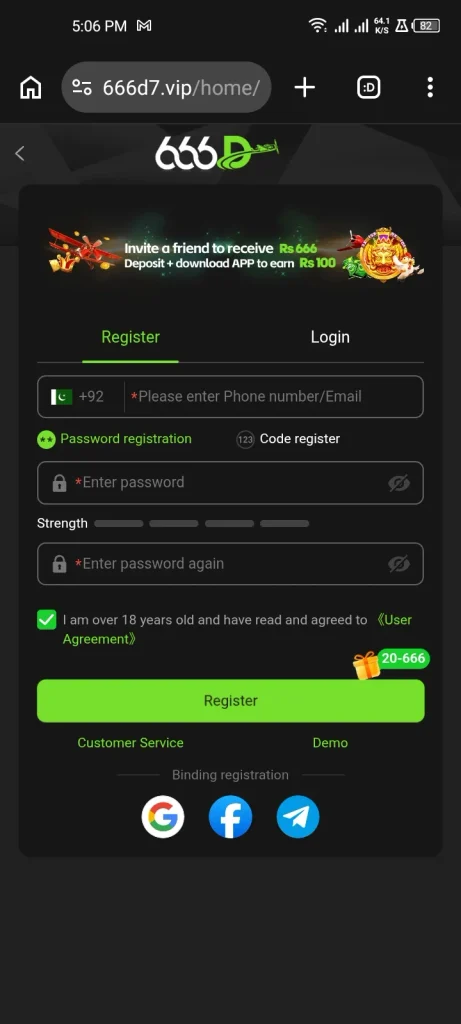
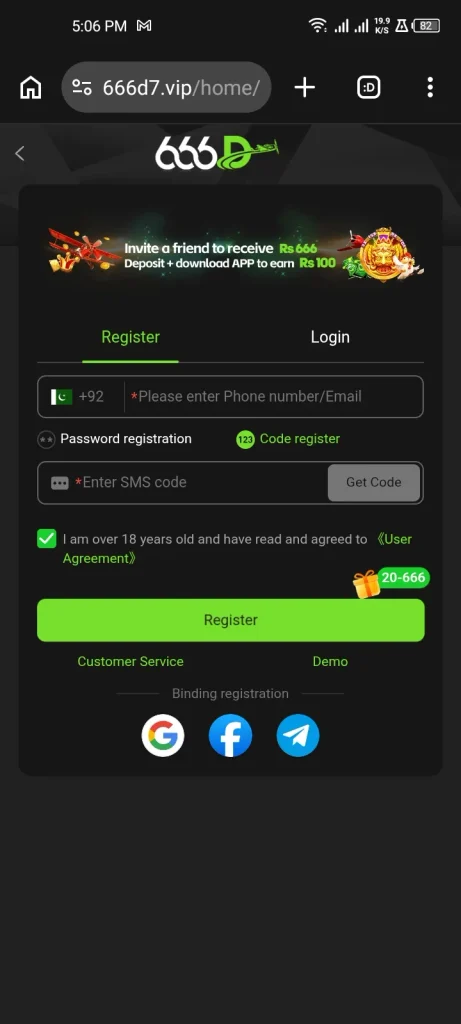
- Now users have two options: either by Password registration or by OTP registration.
- Select one option according to your choice.
- If you have selected Password registration, then create a strong password, confirm it, and tap the Register button.
- If you have selected OTP registration, then tap the Send Code / OTP button once and wait for the SMS.
- Enter the OTP exactly as received before it expires.
- Add an invite code only if you have one (leave blank if not).
- Review the details, read and accept the terms, then tap Submit.
Tip: App screens can change after updates. Always follow what your own screen shows.
How to Register on iPhone and on PC?
iPhone
Open Safari → visit the registration link → tap the Share icon → choose “Add to Home Screen”. The icon then opens like an app. Follow the same steps above.
PC
Open Chrome or Edge → visit the same registration link → click Register. Enter your mobile number, confirm the OTP, and set your password. You can later log in on any device with the same details.
How to Choose a Safe Password?
A weak password is the fastest way to lose an account. Avoid the app name, your phone number, or simple patterns such as “abcd1234”. Instead:
- Use at least 10–12 characters.
- Mix uppercase, lowercase, numbers, and a symbol.
- Never reuse a password from email, banking, or other apps.
- Store it in a password manager or a private note – never in a chat.
- Never share your OTP with anyone, even if they claim to be support. Real support never asks for your code.
OTP Not Received? Network-Specific Fixes
This is the most common registration problem. Most cases have simple causes:
| Network | Common Cause | What to Try |
|---|---|---|
| Jazz | Weak signal or filtered short codes | Restart phone, move to an open area, request OTP once more |
| Zong | SMS delay during busy hours | Wait a full 60–90 seconds before retrying |
| Telenor | Message filtering or spam settings | Check blocked / spam folders |
| Ufone | Low balance or SMS service limits | Confirm SIM can receive SMS, then try again |
General fixes that work across all networks
- Confirm the number you typed is correct.
- Toggle Airplane Mode on and off to refresh the connection.
- Do not press the resend button repeatedly – multiple requests can slow delivery.
- If nothing arrives after several minutes, contact support through the official channel inside the app.
Common Registration Errors and Quick Fixes
| Error | Likely Cause | Fix |
|---|---|---|
| Number already registered | You created an account earlier | Use Login or the password-reset option |
| Invalid / expired OTP | Wrong or timed-out code | Request a new code and enter it promptly |
| Password rejected | Does not meet length/mix rules | Use a longer mix of letters and numbers |
| Network/connection error | Unstable internet | Switch between Wi-Fi and mobile data |
| Page will not load | Outdated cache or old app | Clear browser cache or update the app |
Why Do Different 666D Websites Show Different Details?
Many independent guide sites use the 666D name. They update at different times and sometimes list different file sizes, versions, or minimum deposits. Treat the screen inside the official app (or the page you reached from this site) as the final reference. If a website asks you to pay any fee to “unlock”, “activate” or “verify” an account, close it immediately – registration is free.
How to Avoid Fake Registration Pages
- Read the full web address letter by letter before typing anything.
- Ignore sign-up links sent by unknown WhatsApp, Telegram, or social-media accounts.
- Avoid any page that promises “special”, “unlocked”, “modified” or “VIP” accounts.
- Never enter your OTP or password on a page you reached through an unknown message.
If anything looks suspicious, close the page and return to the official 666D homepage (this site).
What Happens After You Register?
- Log in once more to confirm your number and password work.
- Save your login details somewhere private.
- Check the payment methods currently shown inside the app (options can change).
- Read any promotion or bonus terms carefully before accepting.
- Set personal limits for time and spending before your first session.
Some later actions (especially withdrawals) may require extra verification. Enter accurate details from the start so you avoid delays.
666D Register in Roman Urdu
666D account kaise banaye? Sab se pehle is page se registration link kholein aur Register ka option chunein. Phir apna active Pakistani mobile number carefully likhein aur OTP ka intezar karein. OTP aane ke baad usay enter karein, mazboot password banayein, aur form submit karein.
OTP na aaye to kya karein? Phone restart karein, signal check karein, Airplane Mode on-off karein, aur 1–2 minute baad dobara try karein. Baar baar resend na dabayein.
Zaroori hidayat: Apna OTP ya password kisi ke saath share na karein. 18 saal se kam umar ke afrad register na karein. Account banana bilkul free hai – kisi ko fee mat do.
Responsible Use
Set clear limits before every session. Take regular breaks. Never chase losses. Stop if the app starts affecting your mood, work, or daily expenses. Never use money you need for essentials. Play only for entertainment.
Final Thoughts
666D Register takes only a few minutes when you prepare in advance. A unique password, careful OTP handling, and checking the link protect you from the most common problems. Remember, the app is for adults 18+, involves real money, and works best with clear personal limits.
Ready to begin?
Start your 666D Register now from this page, or read the official download guide first if you still need the APK.
Frequently Asked Questions
Creating an account costs nothing. Nobody should ask you for a registration fee.
It’s up to you: either you select the OTP option or the password option.
Normally, you can make one account with a single number, and you cannot use it twice. Use Login or password reset if the number is already registered.
Use the Login or “Forgot Password” option.
This depends on the platform’s support policy. Contact support through the official in-app channel.
Most common reasons: wrong number, expired OTP, or weak connection. Use the error table above.